TABLE OF CONTENTS

EdApp built its reputation as a mobile learning management system used to create and deliver training via bite-sized, gamified courses. That version of EdApp does not exist anymore.
Following SafetyCulture's acquisition of EdApp, the product was rebranded to SC Training, and has since been folded fully into Mitti, SafetyCulture's own new company name as of August 2026. If the renaming itself is what brought you here, we've laid out the full EdApp - SC Training - Mitti timeline separately.
Despite the name changes, the underlying question for buyers has not changed. Mitti, the product still widely known as EdApp, is not the only option for mobile learning, microlearning, and frontline training, particularly once execution, workflow integration, and company-specific guidance start to matter.
So whether you're an existing customer who has already made the SC Training to Mitti migration, or exploring the market before committing to anything, this guide walks through three platforms to consider: eduMe (that's us!), 7Taps, and TalentCards.
Follow along or use our left hand side navigation to quick jump to the section most relevant to you.
Top EdApp competitors at a glance
| Platform | What it is best for | Key strengths | Considerations |
|---|---|---|---|
| SC Training (formerly EdApp, now Mitti) | Mobile training bundled inside Mitti's broader inspections and operations platform | AI course creation from documents, prompts, or a 1,000+ course library; gamification (leaderboards, achievements, banners); offline access; training tied directly to inspection and issue workflows |
One module inside Mitti's much larger ops suite rather than a dedicated training product; pricing is seat-based across the whole platform, not training-specific. |
| eduMe | Frontline enablement and execution | Training, knowledge and guidance embedded in workflows; app-less delivery; AI-powered answers for frontline workers; Workday-certified integrations | Deprioritises gamification; focused on execution over course variety |
| 7Taps | Ultra-light microlearning creation | Extremely fast course creation; simple templates; minimal admin overhead | Limited depth; not designed for operational execution or guidance |
| TalentCards | Card-based mobile training | Simple flashcard-style learning; offline access; straightforward setup | Best suited to basic knowledge distribution rather than complex enablement |
Why SC Training (formerly EdApp, now part of Mitti)?
Mitti is the current name for the training module most people still know as EdApp, or by its interim name, SC Training. It's widely used by teams looking for a mobile learning management system, with a focus on helping organizations create, manage, and distribute courses through a dedicated mobile app, and a strong emphasis on engagement and ease of use.
For teams searching for an "EdApp demo" or "SafetyCulture training demo," it helps to understand what the platform is optimized for today, not what it looked like before the rename.
What it once was: EdApp launched and grew as a standalone mobile LMS, with its own app, its own freemium pricing built around per-learner seats, and a course library and gamification templates as its headline draw. Teams evaluated and bought it purely as a training product.
What it is today: Those same training features now live on as one module inside Mitti, alongside inspections, issue tracking, and asset management, in one app, priced as part of the whole platform rather than sold on their own. Everything below describes that current reality, not the standalone product some readers may still remember.
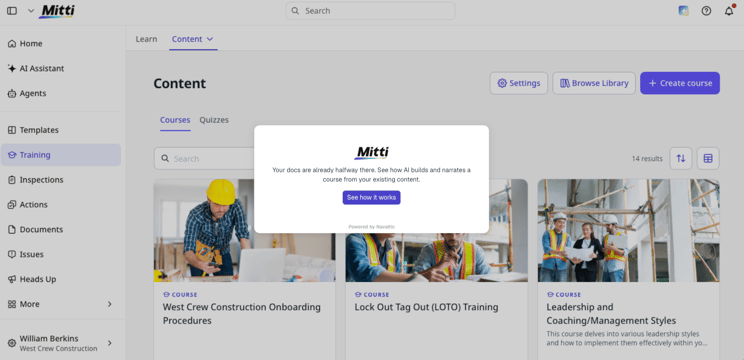
A look at Mitti's Home Screen, which users can take a guided walkthrough of guided walkthrough of
Training as part of Mitti's broader ops platform
Unlike the original EdApp, training is no longer a standalone product. It's one of several modules inside Mitti, alongside inspections, issue tracking, and asset management, all in the same app, and a flagged inspection item can now turn directly into a training course without leaving it.
Workers still access courses through the Mitti mobile app, and success is still measured through completion and quiz performance.
What's changed is pricing: it covers the whole platform rather than training alone, so a team buying Mitti for training is also paying for inspections, checklists, and asset management, whether they use those modules or not.
This suits organizations that already want one app covering inspections and training together. It's a different fit for a team that only wants training and doesn't need the operations layer around it.
Course creation, from documents, prompts, or a library
One of Mitti's strongest differentiators is how fast it turns existing material into a course. A team can upload a PDF, PowerPoint, or Word file and let AI structure it into lessons, describe the course they need and have AI draft it from a prompt, or start from a library of over 1,000 free, editable courses.
This breadth signals two things. First, Mitti serves a wide range of roles, including desk-based and knowledge workers, not just frontline teams. Second, much of the library content is generic by design, built to be reused across many organizations rather than tightly tailored to one company's own procedures.
Mitti does allow teams to build and customize their own courses, but the platform itself is still not oriented primarily around company-specific execution guidance or site-level operational consistency.
Gamification and engagement mechanics
Gamification remains one of Mitti's biggest differentiators, and it has not been quietly discontinued as some third-party write-ups have suggested. The current product still includes leaderboards, achievements, and shareable certificates, on top of standard quizzes and in-lesson assignments.
For organizations that want to increase engagement through play-based learning, this variety can be appealing. Other teams actively deprioritize gamification, particularly in frontline environments where mobile use needs to stay tightly focused on task completion and safety, where the additional interactivity can feel distracting rather than supportive. As with most learning tools, this comes down to fit rather than quality.
Discussion, group sessions, and in-person checks
Mitti supports in-lesson discussions and forums, and lets teams log group sessions like toolbox talks and classroom-style training in one place. In-person competency checks can then be layered on top of the digital training, so a manager can verify a skill actually landed on the job, not just that a course was completed.
This approach suits organizations that want a digital layer around more traditional, session-based training, and it is less focused on supporting execution in the moment than on structured learning that happens before or after work.
Mitti Pricing
Mitti's pricing (current as of September 2026) is set at the platform level, not per training module.
The Free plan covers up to 10 seats and includes basic training, inspections, and reporting at no cost.
The Premium plan is $24 per seat per month billed annually, or $29 per seat per month billed monthly, and adds unlimited active inspection templates, advanced training, and advanced security including SSO.
Enterprise pricing is available on request for larger organizations needing site-based pricing and enterprise-grade user management. A thirty-day free trial of any plan is available with no upfront commitment. Visit their pricing page for more.
The key difference from the old EdApp model: there is no training-only tier. Every plan is priced for the full Mitti platform.
Mitti demo
Mitti also provides direct sign-up access to a live environment, which makes it easy for teams searching for an EdApp, SC Training, or SafetyCulture training demo to explore the product hands-on, alongside a bookable guided demo.
Top EdApp alternatives
Mitti is a strong option when mobile course creation, gamified engagement, and an all-in-one operations app are the priorities.
Organizations typically look at alternatives when they need:
-
training tied more closely to day-to-day execution, without also adopting Mitti's inspections and asset-management suite
-
knowledge surfaced at the moment of need, not just in courses
-
less emphasis on gamification and more on application
-
tighter integration with operational and HR systems like Workday
Below are three alternatives that approach these needs differently.
1. eduMe
As opposed to Mitti, eduMe is not positioned as a mobile LMS, and it is not bundled with an inspections or asset-management product. eduMe is a frontline enablement platform designed to ensure consistent execution across teams, sites, and roles.
Rather than asking workers to open an app and browse courses, we focus on delivering training, knowledge, and guidance directly in the flow of work.
From courses to execution
In eduMe, training is one component of a broader enablement layer. Content is short, targeted, and delivered when it is relevant, rather than stored in a catalog that workers are expected to browse.
This includes:
- Role- and event-based training delivery. Example: a new hire in a specific role automatically gets that role's onboarding content, without an admin manually assigning it.
- Guidance triggered by moments in the workflow. Example: QR code at a piece of equipment opens the exact safety checklist for that equipment, rather than requiring a worker to search for it.
- Knowledge hubs that act as living SOPs rather than static documents. Example: a worker checking a process mid-shift finds the current version instantly, instead of a printed manual that may be out of date.
- Performance insights that highlight where execution breaks down. Example: manager's can see which site or shift is falling behind on a specific procedure, not just who completed a course.
The emphasis is on readiness and application, not course completion.
Embedded delivery instead of an app-based LMS
eduMe is designed to work inside the tools frontline teams already use. Training and guidance can be delivered through platforms such as Workday, Microsoft Teams, SMS, QR codes, or embedded into proprietary apps and intranets.
This removes the need for another app download and reduces friction for both learners and administrators. Instead of asking workers to remember where training lives, information appears where work is already happening.
For organizations operating at scale, this approach often leads to higher adoption and more consistent use.
AI that supports frontline decision-making, not just content creation
Like Mitti, eduMe uses AI to support content creation. Where it differs is in how AI is used after training is published.
eduMe uses AI to assist with content creation, but its role extends beyond authoring. The platform includes a frontline-facing AI assistant that allows workers to ask questions in natural language and receive answers grounded in approved, company-specific source material.
This is particularly valuable in operational environments where stopping to complete a lesson is not always practical. AI becomes a way to support real-time decision-making, not just content production.
Why some teams choose eduMe over Mitti
Teams that move away from Mitti's training module often cite a mix of reasons:
- they operate across many sites
- processes change faster than training can be updated
- frontline workers need knowledge in the moment
- execution quality is at risk of varying by manager or location
Some are also simply migrating because EdApp itself was retired, rather than actively choosing to switch on preference alone.
eduMe is best suited to organizations that view training as a means to standardize performance, not as the end goal itself.
eduMe Pricing
eduMe's pricing (current as of September 2026) is built around a Core Platform plus optional add-ons, rather than a flat per-user rate.
The Core Platform includes AI content creation, role-based delivery via SMS, email, and QR code, completion tracking, and standard integrations, and is quoted per organization based on workforce size and needs.
Additional capabilities, including deeper Workday and HRIS integrations, advanced compliance and in-person assessments, the full frontline AI toolkit, and broadcasts, are available as add-ons.
That's a deliberate difference from an all-in-one seat price like Mitti's: rather than bundling every capability into one number regardless of use, extra capability here is opt-in, so a team that only needs the Core Platform isn't paying for compliance tooling or deeper integrations it hasn't asked for. Get your quote for pricing specific to your team.
To see the delivery model firsthand before committing, book a personalized demo or watch a pre-recorded one.
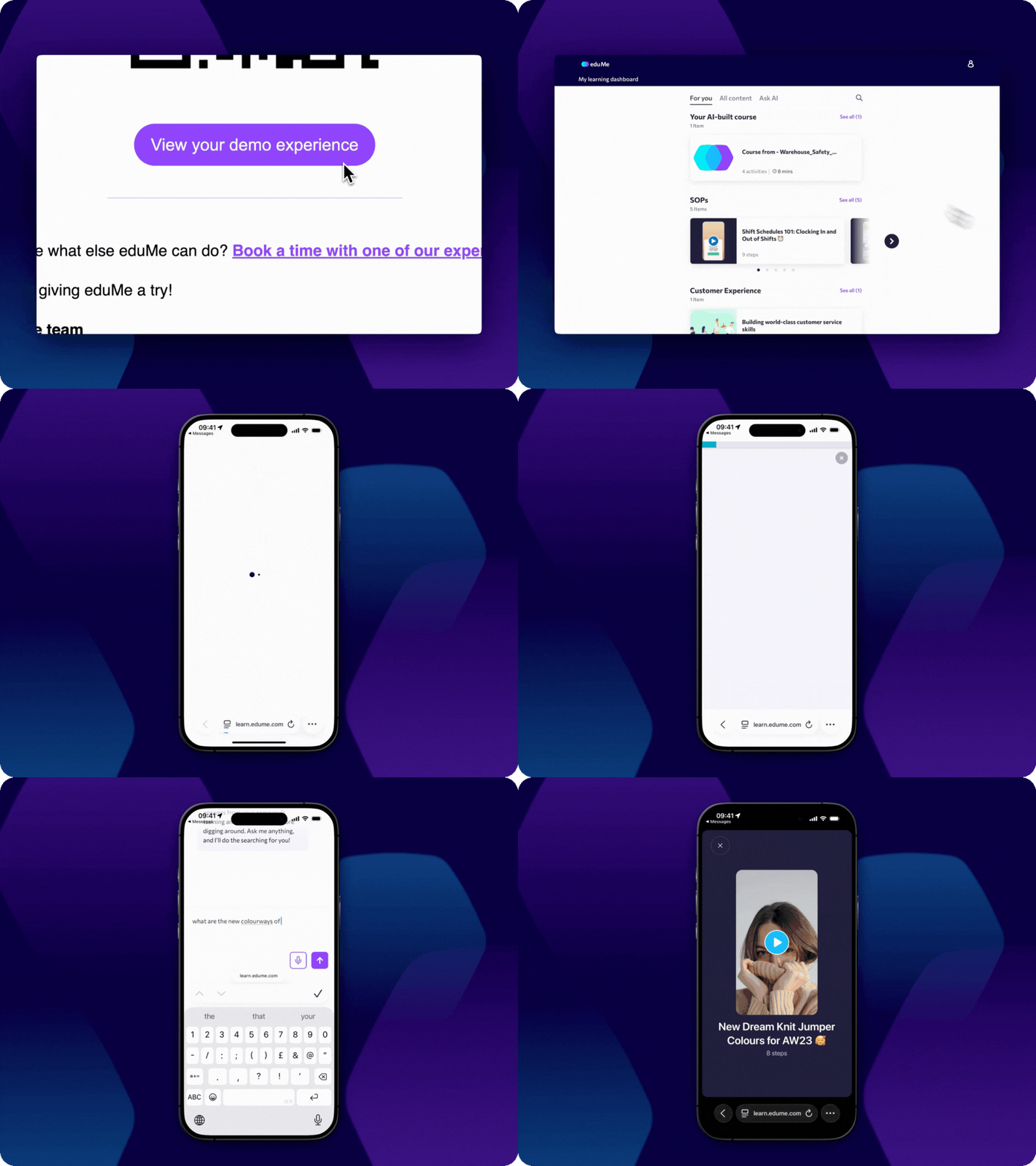
Experience eduMe in <60 seconds
No credit card required. No software to install. Just a hands-on preview of how frontline teams learn with eduMe.
2. 7Taps
7Taps is built around one core idea: make it extremely fast to create and share short learning moments. The platform focuses on ultra-brief microlearning delivered through simple, swipeable cards that can be shared via links, QR codes, or embedded into other tools.
This makes 7Taps meaningfully different from EdApp, which supports more structured courses, richer media, and a broader range of learning formats.
7Taps microlearning card format
At the heart of 7Taps is its card-based lesson structure. Each lesson is designed to be consumed in seconds rather than minutes, with strict limits on text length and media duration.
This constraint is intentional. It encourages teams to strip content down to a single idea or instruction, making 7Taps effective for reminders, updates, and lightweight reinforcement.
In practice, teams use 7Taps to:
- push short policy updates
- reinforce a single behavior or message
- share quick reminders ahead of a shift or event
It is not designed for layered programs or multi-step execution guidance.
7Taps content creation speed
7Taps is often chosen because of how quickly content can be created. The platform relies on predefined templates rather than open-ended authoring tools, which reduces setup time and lowers the barrier for non-L&D teams.
This speed comes with trade-offs. There is limited flexibility in formatting, limited support for longer narratives, and fewer options for structuring content into ongoing programs.
For teams that value immediacy over depth, this is often acceptable.
Where 7Taps fits best
7Taps works well when:
- training needs are lightweight and frequent
- speed matters more than structure
- content does not need to persist as a long-term knowledge base
It becomes less suitable when organizations need:
- consistent execution across roles and locations
- company-specific guidance surfaced at the moment of need
7Taps Pricing
7Taps offers a Free plan at $0 forever, which is suitable for small teams that want to experiment with creating and sharing microlearning using its core authoring and delivery tools.
A Starter plan is priced at $4,995 per year, adding advanced learning design tools, basic analytics, and extended sharing for teams ready to launch a real program.
For larger organizations, 7Taps Enterprise is priced on a quote basis and is used when teams need to make microlearning a repeatable, scalable driver of performance, with SSO, HRMS integration, and enterprise support.
The figures above are current as of September 2026. View 7Taps pricing.
3. TalentCards
TalentCards takes a different approach to mobile learning, organizing content into digital flashcards that learners can review on their phones. The experience is intentionally simple, with a focus on repetition and recall rather than rich interaction.
Compared with Mitti, TalentCards is narrower in scope, but that simplicity can be an advantage in the right context.
TalentCards card-based mobile learning
TalentCards structures training content as individual cards grouped into sets. Each card typically contains a short piece of text, an image, or a basic question.
This format is well suited to:
- terminology
- product facts
- procedural steps
- safety reminders
Because content is broken into discrete units, learners can dip in and out quickly without committing to longer sessions.
TalentCards offline access
One of TalentCards’ practical strengths is offline access. Learners can download card sets and review them without an internet connection, which is useful in environments with limited connectivity, such as field teams, remote locations, or workplaces where devices are shared.
Offline access is less relevant for platforms that rely on real-time integration with other systems.
Where TalentCards fits best
TalentCards works best when:
- training needs are straightforward and repetitive
- content is stable and unlikely to change frequently
- teams want minimal setup and administration
It is less suitable for organizations that need:
- dynamic, role-based guidance
- integration with HR or operational systems
- training that adapts to performance signals.
TalentCards Pricing
TalentCards offers a Free plan covering up to five users at no cost.
The Standard plan is $0.80 per user per month, sold in increments of 50 users (starting at a minimum of 50 users).
The Premium plan is $1.20 per user per month, also sold in 50 user increments, and adds unlimited AI course creation and automated push notifications.
Enterprise pricing is available on request for organizations with more than 2,000.
The above is current as of September 2026. View TalentCards pricing.
Final verdict on the best EdApp/SC Training (now Mitti) alternatives
SC Training (formerly EdApp, now part of Mitti) is a solid mobile LMS for organizations that want accessible, gamified courses and a broad content library, bundled inside a wider operations platform with a generous free tier and easy demo access.
The right alternative depends on what you expect training to achieve:
- Choose eduMe if your priority is execution, consistency, and surfacing knowledge inside workflows rather than creating more courses.
- Choose 7Taps if you need extremely fast, lightweight microlearning with minimal setup.
- Choose TalentCards if you want simple, card-based mobile training for basic knowledge sharing.
For teams who want to go beyond course completion and understand how enablement actually shows up for frontline workers, we offer a free, guided eduMe trial that lets you experience how training and guidance appear in the flow of work.
Join 10,000+ frontline leaders
Subscribe to ‘Training the Frontline’ and get weekly insights sent straight to your inbox.