TABLE OF CONTENTS

Renewal cycles, changing workforce models, and pressure to simplify or modernize training systems - these are all driving forces that cause L&D teams to pause and reasses whether their current learning software still fits the way the organization operates.
In those moments, the question is rarely whether the software works at all.It’s whether it works well enough for today’s mix of learners, delivery constraints, and business priorities.
Teams looking for a Bridge LMS alternative typically know where Bridge is strong. So, you're likely here to understand how other platforms stack up and where they differ - and how those platforms may (or may not) suit your company's requirements when it comes to day-to-day administration and learner efficacy.
Read on as we run through three Bridge LMS alternatives and look at where each platform fits ideally, where it introduces friction, and how those differences matter depending on factors like workforce composition, operating model, and budget.
At a glance: Bridge LMS vs. eduMe vs. TalentLMS vs. Cornerstone
| Platform | Primary fit | Where it works well | Key trade offs |
|---|---|---|---|
| Bridge LMS | Corporate learning and performance | Structured programs, manager led development | Less flexible for frontline or time constrained roles |
| eduMe | Frontline and deskless teams | Mobile first microlearning, operational training, just in time delivery | Not intended as a full enterprise LMS |
| TalentLMS | Small teams and simpler rollouts | Fast setup, lower cost, broad LMS basics | Limited depth for complex development programs |
| Cornerstone | Large enterprises with compliance focus | Scale, auditability, regulated environments | Higher cost and heavier implementation |
Why teams choose Bridge LMS in the first place
Bridge LMS is a learning management system built around structured employee development, performance alignment, and manager-led growth. It is most commonly used by organizations that want learning to sit alongside goal setting, feedback, and career progression rather than exist as a standalone content repository.
Bridge is typically deployed in environments where employees have regular access to a desktop, time allocated for learning, and managers who are expected to actively support development conversations.
This makes it a strong fit for knowledge-worker populations in industries such as financial services and higher education, where learning cycles are planned and performance development is treated as an ongoing responsibility rather than an ad hoc activity.
Who Bridge LMS is designed for
Bridge LMS fits best in organizations with a predominantly desk-based workforce that views training as a long-term, career-developing activity. These teams benefit from curated learning paths, structured performance check-ins, and development plans that evolve over time, supported by managers who play an active role in coaching and progression.
The platform is less oriented toward reactive or just-in-time training and more toward environments where learning, feedback, and performance discussions are deliberately scheduled and closely linked.
Bridge LMS core strengths and key features
Bridge LMS is most often chosen for its ability to connect learning with ongoing performance management. In day-to-day use, it functions less like a standalone LMS and more like a system for structuring development conversations, skill progression, and accountability over time.
This focus shows up most clearly in its performance management and skills functionality, where learning activity is tied directly to goals, feedback, and workforce capability rather than treated as isolated content consumption.
Bridge LMS performance management
Bridge’s 'Performance Management System' brings goal setting, performance reviews, career development plans, and ongoing feedback into a single workflow. Managers and employees work from shared context rather than disconnected tools.
Goals can be aligned from the organizational level down to individuals, making it easier to connect learning activity to broader objectives. Regular performance reviews and shared 1:1 agendas provide structure for continuous conversations around progress, roadblocks, and development priorities, rather than relying solely on annual review cycles.
Peer recognition and feedback features support more frequent input across teams, which helps surface performance signals that would otherwise be missed between formal reviews. For organizations that expect managers to play an active role in coaching and development, this creates a consistent cadence without relying on external systems.
Bridge LMS skill development and insights
Bridge’s skill framework underpins much of its learning and performance functionality. The platform maintains a centralized skills taxonomy and links skills to roles, development plans, and learning content.
AI-Powered Skill Development reduces the administrative effort of mapping content to skills, while built-in skills feedback allows managers and peers to assess proficiency and identify gaps. This data feeds into skills insights and 9-box talent reviews, giving leaders a clearer picture of workforce capability and succession readiness.
The inclusion of a bundled library of Skillsoft courses, pre-tagged to in-demand skills, allows teams to activate skill development quickly without sourcing content separately. This supports organizations that want learning to be tightly coupled to capability building rather than content consumption alone.
Reporting and visibility for admins and managers
From an administrative perspective, Bridge provides reporting across enrolments, completions, overdue learning, and skill coverage. Managers can view progress against goals and see where skill gaps exist within their teams, while L&D teams retain oversight without micromanaging delivery.
With the ability to connect learning content with goals and manager feedback, managers are set up to knowledgeably enter development conversations with employees.
This model works best in environments where learning cycles are planned, participation can be scheduled, and performance development is treated as an ongoing managerial responsibility rather than an ad hoc activity.
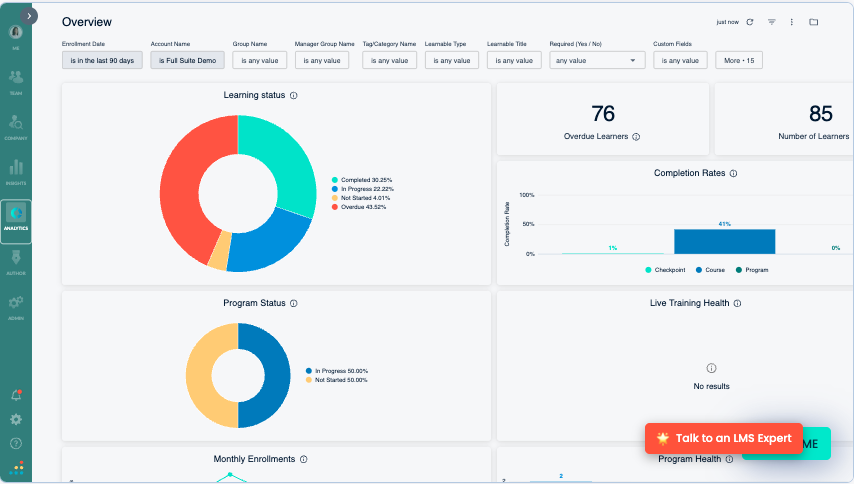
Bridge LMS analytics overview: how system administrators view performance insights
Practical constraints to be aware of
Bridge LMS is less optimized for frontline and deskless workforces.
Employees who do not regularly sit at a desk or who need training delivered at the moment of need often experience friction. Content discovery, login requirements, and longer-form learning assume time and attention that frontline roles may not have.
For organizations with a growing operational workforce, this gap often triggers an evaluation of alternatives.
Bridge LMS pricing
- Annual agreements start at $12,500
- For a quote, users must speak to sales
More details can be found on their pricing page. For a deeper dive into Bridge LMS's core user experience and functionality, users can engage with an interactive product demo on their website.
The Bridge LMS alternative shortlist
The following platforms appear in evaluations alongside Bridge LMS. It its worth noting that each represents a different philosophy and best suits a particular set up, rather than any acting as a like for like Bridge LMS replacement or substitute.
-
eduMe. eduMe addresses frontline and deskless workforce training, focusing on speed, accessibility, and operational execution.
-
TalentLMS. TalentLMS offers a simpler LMS model for teams that want core functionality without the overhead of a development-centric platform.
-
Cornerstone. Cornerstone best serves organizations where compliance, scale, and auditability outweigh ease of use or speed of deployment.
Bridge LMS sits in the learning and performance category that blends traditional LMS functionality with development tools such as skills, feedback, and manager enablement. It is commonly selected by organizations that want learning tightly connected to performance conversations and career development rather than treated as a standalone content repository.
In practice, Bridge LMS is most at home with knowledge workers who have regular access to a desktop environment and the time to engage with structured learning paths. Its strengths show up in planned programs, manager visibility, and internal development frameworks.
The limitations usually appear when learning needs become more operational or more distributed.
Teams with large frontline populations, high turnover, or limited device access often find that the experience assumes more time and attention than those roles can realistically give.
eduMe as a Bridge LMS alternative
Product overview - eduMe's key strengths and features
eduMe focuses on training delivery for frontline and deskless workers.
Rather than acting as a central destination LMS, eduMe pushes short, targeted learning into the tools and channels employees already use, with a repository of out of the box third party integrations. This includes communications tools such as Microsoft Teams, HRIS/HRM like Dayforce, ADP or Workday.
Having no app, eduMe does not provide users with a destination to visit - it primarily lives inside other key softwares and workflows that vary on a customer-by-customer basis.

This includes access from within a traditional LMS, where a customer might need both short-form microlearning alongside content libraries of ready-made or longer-form training materials..Its role is to handle the parts of training that struggle inside traditional learning environments.
eduMe's mobile-first microlearning
eduMe delivers training in short, focused units designed to be completed during work rather than around it.
Content is optimized for phones and shared devices like iPads or tablets, with one tap access from homescreens or other apps instead of formal logins. This matters in environments where employees do not sit at a desk or have time to navigate catalogs.
For buyers evaluating Bridge LMS alternatives, this approach is often the clearest point of difference - Bridge expects learners to come to the platform, eduMe brings learning to the moment it is needed.
eduMe embedded delivery in daily tools
A defining characteristic of eduMe is distribution. Training can be delivered through SMS, QR codes, workforce apps, or integrations with systems already used on the job. This reduces friction for large or seasonal teams where account management and credentials become an operational burden.
This embedded model contrasts with Bridge LMS, which functions as a destination system even when accessed on mobile.
eduMe's AI assistants and content creation speed
eduMe includes tools aimed at rapid content creation, including AI assisted lesson creation and conversion of existing materials into short formats. The emphasis is on speed and relevance of content - for example the rolling out of company-specific product manuals or SOPs for Retail - rather than long form course design.
Teams that rely on detailed, multi hour courses may find this limiting. Teams that need to update guidance weekly or respond to operational change often see this as an advantage.
eduMe limitations and trade offs
eduMe does not try to be a full LMS. It does not replace deep learning paths or complex performance frameworks. Organizations looking to consolidate everything into a single learning platform may still need an LMS alongside it.
Best fit use cases for eduMe
eduMe fits organizations with large frontline populations, high turnover, or operational training needs tied closely to daily work. It is less suitable as the sole learning platform for corporate development programs.
eduMe Pricing
- Agreements start at $3.49 per user for a minimum of 100 users
- For enterprise pricing packages or a custom quote, users must speak to sales
More details can be found on our pricing page.
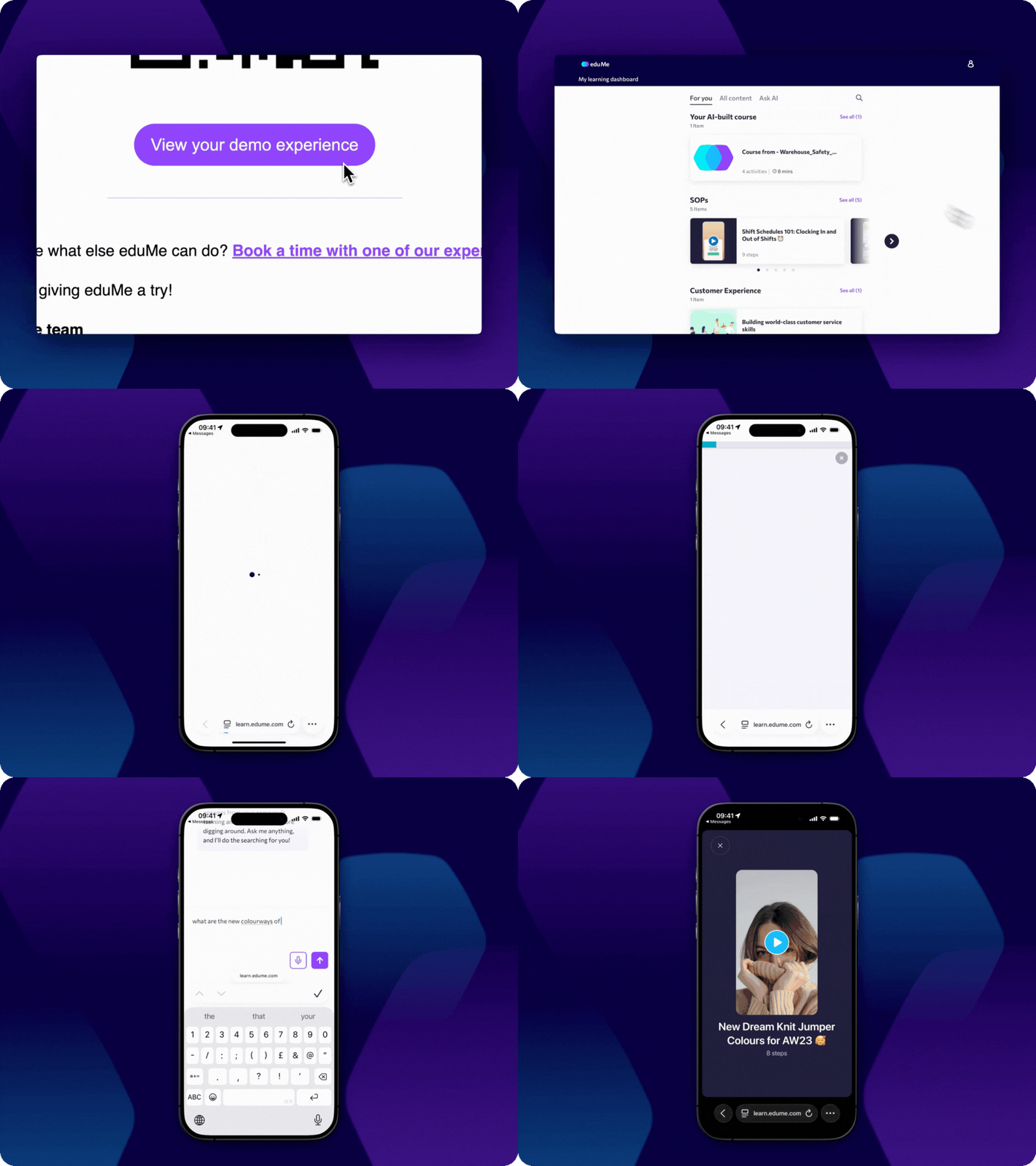
For a deeper dive into eduMe's core user experience and functionality, eduMe offers visitors a 'Try for Free' experience that showcases key of interest user flows, and allows users to experience eduMe's AI functionality - including a learner chatbot and AI file-to-lesson conversion.
TalentLMS as a Bridge LMS alternative
Product overview
TalentLMS is a general purpose LMS aimed at teams that want a straightforward way to deliver courses, track completion, and get up and running quickly. It is often considered when buyers want to reduce complexity or cost compared to more feature rich platforms.
It also offers different product tracks that diverge from core LMS functionality as defined by user need- from enterprise-targeted plearning tool 'eFront' to 'TalentHR', an all-in-one HRIS for small to medium sized businesses.
TalentLMS fast setup and simplicity
TalentLMS is known for short implementation timelines and minimal configuration. Course creation, user management, and reporting are designed to be accessible without specialist support. For organizations that feel over served by Bridge LMS, this simplicity can be appealing.
TalentLMS core LMS functionality
The platform covers the expected LMS basics such as SCORM support, quizzes, certificates, and user groups. It works well for compliance training, onboarding, and internal knowledge sharing when requirements are relatively stable.
TalentLMS includes a set of built-in AI tools under the TalentCraft umbrella that focus on speeding up course creation and reducing manual setup rather than introducing advanced automation or adaptive learning.
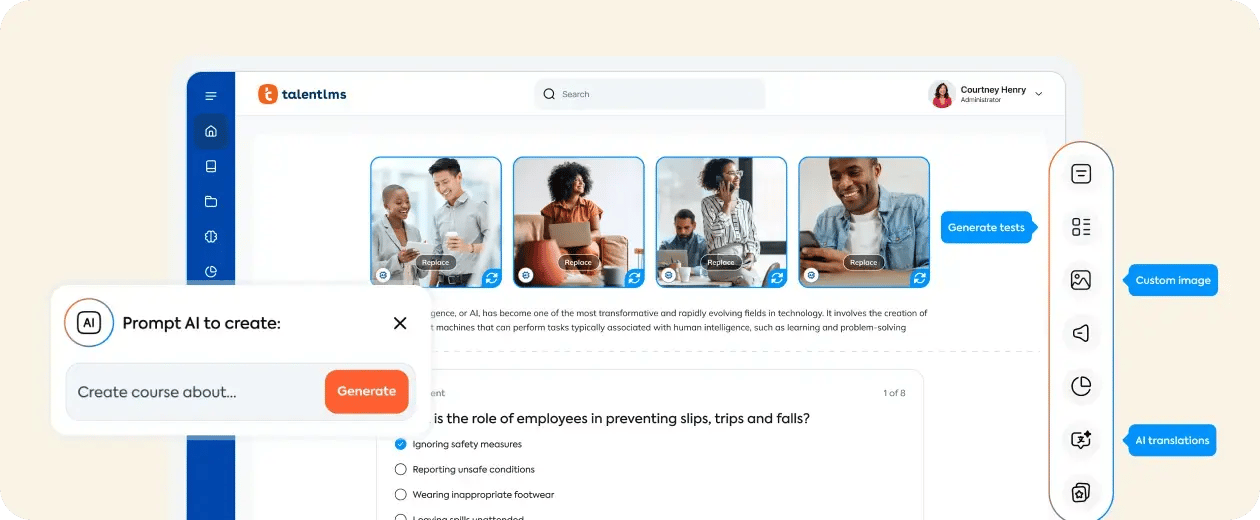
TalentCraft allows admins to generate complete course structures, sections, and learning materials from prompts or existing documents such as PDFs. It supports common instructional elements including text pages, step-by-step processes, images, charts, flashcards, and assessments, all editable through a standard WYSIWYG editor.
Overall, TalentLMS’s AI functionality is oriented toward workflow efficiency and faster content production rather than deep personalization or performance-driven learning logic.
Limitations and trade offs
Compared to Bridge LMS, TalentLMS offers less depth around performance management, skills frameworks, and manager workflows. It is not designed to support complex development programs or tightly integrated talent processes.
Best fit use cases
TalentLMS suits small to mid sized teams prioritizing speed, simplicity, and cost control. It is less appropriate where learning is tightly tied to performance cycles or career progression.
TalentLMS Pricing
TalentLMS publishes pricing tiers, which makes early stage evaluation easier. This transparency often attracts smaller teams or departments that need predictable costs.
- Pricing begins with a 'Core' package at $119/ month for 1-40 users
- For enterprise pricing packages or a custom quote, users must speak to sales
More details can be found on their pricing page. Talent LMS also offer a freemium product experience, which allows users to set up an account and creating and browsing content.
Cornerstone as a Bridge LMS alternative
Cornerstone Learn’s core strengths and operating model
Cornerstone Learn sits at the enterprise end of the LMS market and is typically evaluated when organizations require scale, auditability, and formal learning governance across large, distributed workforces. It is most commonly used by global enterprises in regulated or highly structured industries such as financial services, healthcare, life sciences, aviation, manufacturing, and the public sector.
Unlike Bridge LMS, which blends learning with performance and manager enablement, Cornerstone Learn functions primarily as a centralized system of record for learning activity. It is designed to manage large volumes of users, content, certifications, and compliance data in a controlled and repeatable way across regions and business units.
Cornerstone is often deployed as part of a broader Cornerstone ecosystem, alongside content subscriptions, skills intelligence, or talent modules, although Learn can also operate as a standalone LMS.
Cornerstone enterprise scale and compliance management
Cornerstone Learn is built to support very large user bases, complex organizational hierarchies, and strict regulatory requirements. It provides detailed tracking of enrollments, completions, certifications, and recertification cycles, with audit-ready reporting that supports internal governance and external compliance reviews.
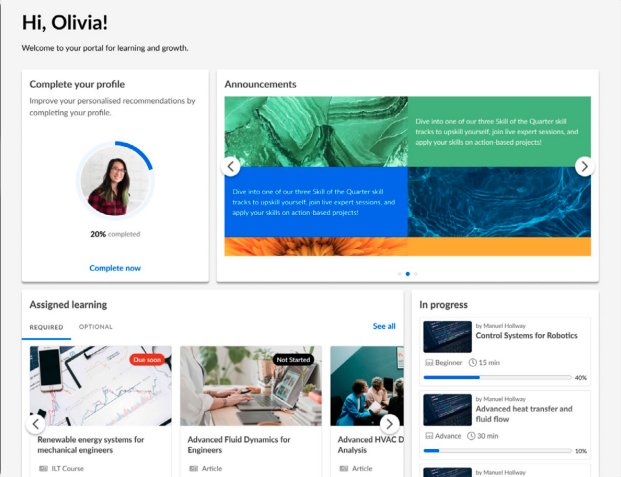
Cornerstone Learn: Learner Dashboard View
This makes it a common choice in environments where learning outcomes must be documented precisely, such as mandatory safety training, regulatory certifications, and role-based compliance programs. Compared to Bridge LMS, Cornerstone places greater emphasis on consistency, documentation, and long-term record keeping rather than flexibility or learner autonomy.
Cornerstone skills, content, and learning ecosystem
Cornerstone Learn integrates with Cornerstone’s broader content and skills ecosystem, including curated content libraries and skills taxonomies. Organizations can map learning content to roles, skills, and career frameworks, which supports workforce planning and talent mobility initiatives at scale.
This approach works well for enterprises that want a single vendor to cover formal learning, content licensing, and skills visibility across the organization. It is less focused on rapid content iteration or localized knowledge sharing and more oriented toward standardized, centrally governed learning programs.
Cornerstone integrations and enterprise customization
Cornerstone supports a wide range of integrations with HRIS platforms, identity providers, and third-party content vendors. It also offers extensive configuration options to align with complex enterprise architectures, approval workflows, and data requirements.
This flexibility allows Cornerstone Learn to fit into sophisticated global environments, but it typically requires longer implementation timelines and ongoing administrative effort. Compared to Bridge LMS, changes to structure, workflows, or learning models tend to involve more planning and coordination.
Limitations and trade-offs
Relative to Bridge LMS, Cornerstone Learn generally comes with higher costs, longer implementation cycles, and greater administrative overhead. The learner experience and content management workflows can feel heavier for teams used to faster iteration or more modern interfaces.
Cornerstone is also less well suited to frontline or deskless workforces where access, speed, and in-the-moment learning matter more than formal course structures and reporting depth.
Best-fit use cases for Cornerstone Learn
Cornerstone Learn fits large enterprises where compliance, auditability, and global consistency are non-negotiable. It works best when learning programs are centrally designed, formally assigned, and closely monitored over time.
It is less attractive for organizations prioritizing lightweight deployment, frontline enablement, or rapid operational training updates.
Cornerstone Learn pricing
Cornerstone pricing varies by product, content bundle, and organization size and is typically provided via custom annual contracts. Specific pricing is available on request only.
You can find out more about Cornerstone Learn here.
Choosing between Bridge LMS and its alternatives
The right choice depends less on feature parity and more on how learning is actually consumed inside your organization:
-
Bridge LMS works well when learning is part of a structured development process supported by managers and regular desktop access.
-
TalentLMS reduces cost and complexity when those structures are lighter.
-
Cornerstone expands in the opposite direction, prioritizing scale and compliance.
-
eduMe diverges entirely by focusing on frontline execution rather than centralized learning management.
Final verdict
For teams evaluating a Bridge LMS alternative, the decision often comes down to audience and operating model.
Bridge remains a solid option for corporate learning and performance alignment. When learning needs move closer to the frontline, or when time and attention become the scarcest resources, a platform like eduMe addresses problems that traditional LMS tools struggle to solve.
If eduMe sounds like it might fit the bill, we offer a free, guided eduMe trial that lets you experience how training and guidance appear in the flow of work to enable large, dispersed teams.
Experience eduMe in <60 seconds
No credit card required. No software to install. Just a hands-on preview of how frontline teams learn with eduMe.
Join 10,000+ frontline leaders
Subscribe to ‘Training the Frontline’ and get weekly insights sent straight to your inbox.